.png?width=200&height=82&name=Inala-Website-Logo-2%20(3).png)
Create a new project in Inala to begin tracking learners, programmes, and progress in Growth Hub. The project is the highest level in the platform hierarchy.
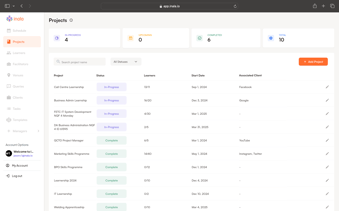
Steps:
- In the left-hand Admin Panel, navigate to the Projects tab.
- In the top-right corner, click the “Add Project” button.
- A pop-up will appear - fill in the required project details (name, start and end date, address, etc.).
- Click Save to create the project record.
You can now begin adding programmes, learners, and scheduling sessions within this project.
Note: You can decide to use Talent Hub per project if you wish to recruit learners or collect documents and information from them. If you select Talent Hub for this project, you will need to purchase credits to enroll your learners. A credit is R25 ex VAT per successful enrolment.
Pro tip: You can create as many programmes beneath a project as you need.